Backup Checklist in 2026: Verify Recovery for Security and Compliance Teams
A successful backup job does not prove that a service can be restored. Use this checklist to define recovery coverage, set RPO and RTO targets, protect recovery copies and verify restoration with evidence your security and compliance teams can review.
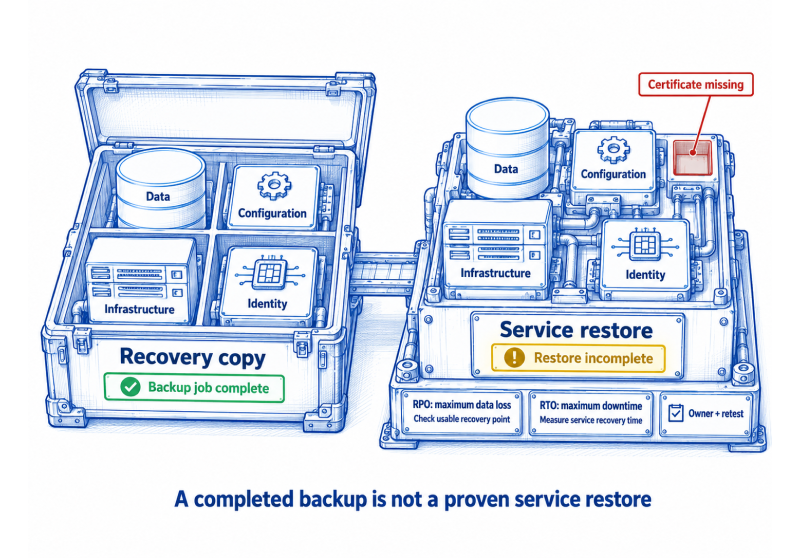
A backup checklist should answer one operational question: can the organisation restore the complete service, within its agreed recovery target, from a copy that the same incident cannot also destroy? A green backup dashboard may show that jobs ran. It does not show that the right data, configurations, identities and recovery dependencies can work together when a critical service is unavailable.
For security, resilience and GRC teams, the difference matters. A useful backup control connects the service in scope, its recovery objectives, the protection method, the owner, evidence of operation and the result of a real restore test. This article sets out how to build that record and use it in daily operations, audits and customer reviews.
What should a backup checklist protect?
Start with the business service, not a storage system. A customer-facing application may depend on production data, application configurations, cloud resources, identity roles, deployment definitions, certificates, keys and integrations. Restoring a database alone may leave the service unusable if the environment cannot be rebuilt or the application cannot authenticate.
For every critical service, build a service recovery record. List the components needed to deliver the service, the method used to recover each component, the accountable owner, the RPO, the RTO and the date and result of the last relevant restore test. This makes a missing dependency visible before an outage.
Business data: databases, files, transactions and customer records needed to resume the service.
Application and infrastructure state: configurations, deployable images, infrastructure as code and environment settings.
Identity and access: directory settings, privileged roles and access policies needed for safe operation.
Recovery dependencies: certificates, keys and secrets handled through approved, secure recovery arrangements.
Required records: logs and audit trails needed for investigation, operations or a defined retention obligation.
A cloud or SaaS provider may operate part of the recovery mechanism, but the contract and configuration define what is actually covered. Confirm whether snapshots are enabled, who can trigger a restore, what is retained, which dependencies remain your responsibility and whether the service has been tested in the way you expect.
How should a backup checklist set RPO and RTO?
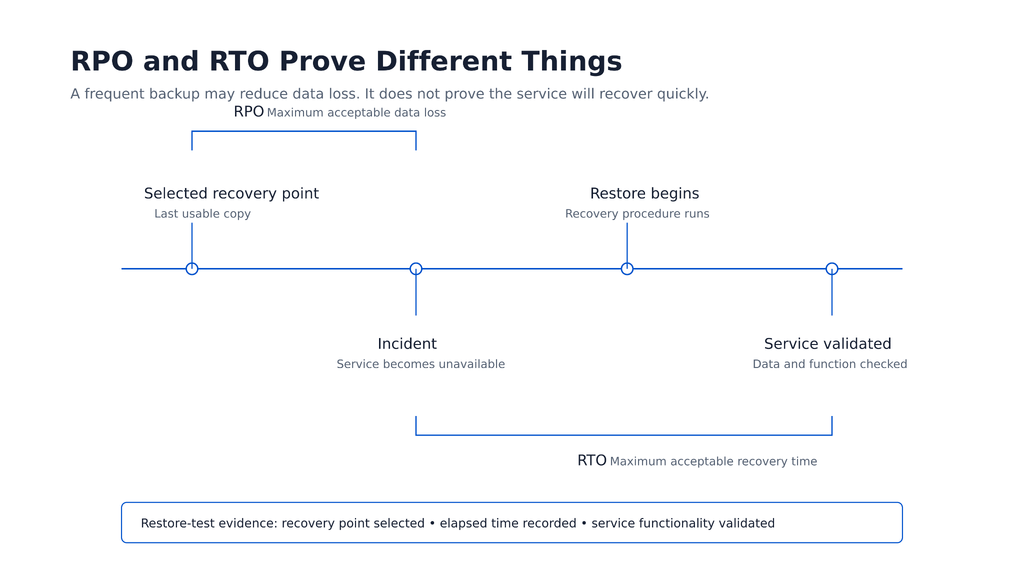
Recovery point objective, or RPO, is the maximum acceptable amount of data loss measured in time. Recovery time objective, or RTO, is the maximum acceptable duration of service disruption. They answer different questions. A frequent snapshot can reduce potential data loss while still leaving a long restore process.
Set both targets with the business owner and recovery team. A billing service that changes throughout the day may need a short RPO and a tested method to restore quickly. A monthly archive may tolerate more data loss and downtime. The target should reflect operational impact, customer commitments, legal obligations and the real cost of interruption.
Measure the age of the latest usable recovery point, not only the schedule written in a policy. An hourly job that fails unnoticed for twelve hours can leave the service outside its RPO even though the configured schedule is still hourly.
Backup checklist for recovery coverage and control health
Use this backup checklist with the service owner, backup operator, security team and GRC lead. Any “no” or “unknown” answer should create an owner, due date and follow-up action.
Control area
Question to answer
Evidence to retain
Service scope
Are all components required to restore the service identified?
Service recovery record and dependency map
Recovery target
Are approved RPO and RTO targets defined for this service?
Business decision, service tier and target rationale
Coverage
Does each required component have a suitable recovery method?
Component-to-method map and backup configuration
Recovery point
Is the latest usable recovery point within the RPO?
Job history, recovery point age and failure follow-up
Protection
Can one compromised identity delete production data and every recovery copy?
Access review, retention lock or protected-copy evidence
Monitoring
Will a failed job or missing source reach an accountable owner?
Alert route, review records and assigned actions
Restore test
Has the team restored the service or a representative scenario within the RTO?
Test plan, timestamps, result and validation record
Change control
Is recovery coverage reviewed when systems or data flows change?
Change record and updated recovery scope
Exceptions
Are open gaps, compensating measures and expiry dates visible?
Approved exception and remediation record
Keep the signals separate. A job can complete successfully while the recovery copy is too old, a new storage location is out of scope, or the restored application fails because a required configuration is missing. Treat coverage, job success, recovery protection and service restoration as distinct conditions.
How do you protect recovery copies from ransomware and administrator error?
Recovery copies need protection from the incident itself. Ransomware and account compromise can target online backups, management consoles, backup credentials and retention settings. For important services, use a protected copy strategy appropriate to the environment, such as immutable storage, an offline copy or another independent recovery path. The choice should follow risk and architecture, not a slogan.
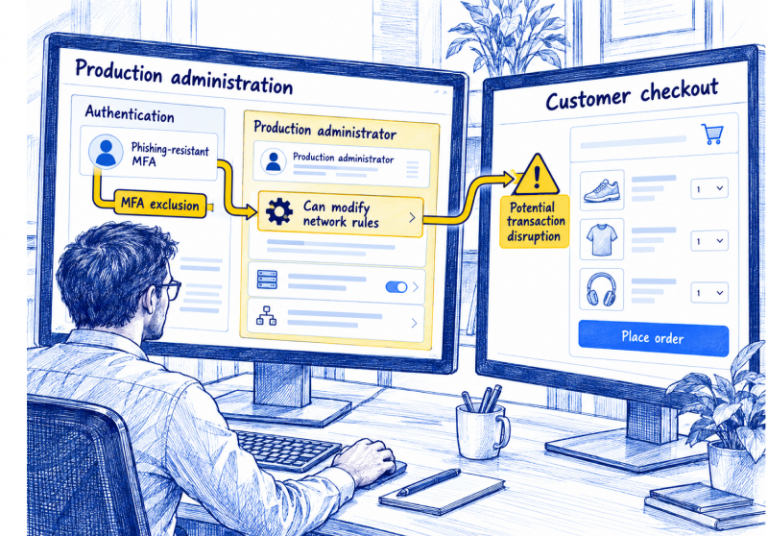
Test the assumed separation. If the same privileged account can administer production and permanently remove every recovery copy, the recovery design may fail during the incident it is meant to address. Review who can delete or shorten retention, disable jobs, change encryption keys or approve emergency access. Give exceptions an owner and expiry date.
What should a restore test prove?
A successful job shows that a backup process ran. A restore test proves whether the copy can be used in the scenario that matters. Start with a defined event, such as a deleted file, failed database, compromised server or unavailable service. The test should exercise the dependencies that the selected scenario requires.
Record the selected recovery point, test environment, people involved, elapsed recovery time and result. Validate that the data is correct and that the application can operate. A technical restore is incomplete if a missing identity setting, certificate, network path or configuration prevents the service from working. When the target is missed, record the cause, assign the fix and repeat the relevant test.
What evidence proves backup and recovery control effectiveness?
For ISO/IEC 27001, backup is addressed in Annex A control 8.13 of the 2022 edition. The organisation should select controls through risk treatment and record applicability in its Statement of Applicability. For SOC 2, evidence needs to match the described system, selected Trust Services Criteria and examination period. A contract or regulator may add more specific requirements.
Keep the service recovery record, actual job history, recovery point age, alerts and actions, access and protection settings, restore test records, and open exceptions together. A screenshot of a scheduled job is only a point-in-time configuration record. It cannot show that the relevant population was covered throughout a period or that the service was restored successfully.
Avoid using a headline job-success rate as the whole control result. The meaningful decision is whether the team detected a gap, understood its impact on recovery targets, fixed it in time and verified the outcome.
Where backup programs fail in practice
A new database, storage location or SaaS dependency is added without a recovery review.
A successful job masks a missing key, configuration or identity dependency during restoration.
A failure alert reaches an unattended mailbox and no owner checks the age of the usable recovery point.
The same identity can remove production data and the recovery copies.
Evidence is assembled just before an audit, with no clear link between the service, the failed job, the decision and the fix.
Build recovery review into service onboarding, material changes and incident follow-up. For connected environments, continuous control monitoring can help teams relate backup evidence, coverage gaps, owners and remediation. Confirm the available sources, refresh intervals and tests for your environment before relying on any platform view.
How SPOG.AI can support a backup control
SPOG.AI can relate defined recovery controls to evidence from connected security, cloud, infrastructure, IT and governance systems. For a backup control, that can help teams see whether in-scope services have the intended protection, when usable recovery points are outside target, which failure needs attention and who owns the follow-up.
The backup and recovery tools still create copies and perform restores. SPOG.AI does not make a service recoverable or replace a restore test. Its role is to help connect the evidence, scope, exceptions and remediation decisions that show whether the backup control is working as expected.
Frequently asked questions
RPO is the maximum acceptable data loss measured in time. RTO is the maximum acceptable service downtime. A recovery design needs to meet both targets where they apply.
Set the schedule from the approved RPO, expected failure conditions and the system’s rate of change. Monitor the actual age of the latest usable recovery point as well as the configured schedule.
Use a risk-based schedule that reflects service importance, change rate and applicable obligations. Test again after material changes to the recovery design or a significant failure.
No. It shows that the job ran. A restore test checks whether the required copy, dependencies and procedure can return the service to a usable state within the recovery target.
Include the components needed to restore the service, such as business data, configurations, infrastructure definitions, identities, certificates, keys, documentation and critical integrations.
No. Immutability can protect a recovery copy from change or deletion for a defined period. It does not prove that the copy is complete, accessible or capable of restoring the service.
Keep scope, control design, job history, recovery point age, alerts and follow-up, protection settings, restore test results and exceptions. Align the evidence with the ISO 27001 risk treatment or the SOC 2 system and selected criteria.
The technical operator should run and monitor the recovery method, while the service owner is accountable for recovery targets and business priority. Security and GRC teams should verify that evidence, exceptions and remediation remain visible.
Keep the original issue, the affected service and target, the owner, action taken and a retest that proves the gap is closed. If risk is accepted temporarily, record the compensating measure, approver and expiry date.
Only to the extent stated in the service and contract. Confirm the provider’s responsibility, your configuration duties, retention settings, recovery steps and the recovery evidence you need.
With 8.5+ years in B2B SaaS, I’ve led demand generation and GTM initiatives across global markets (US, UK, Europe, Africa), helping companies move from fragmented marketing efforts to structured, revenue-focused growth engines.