AWS Security Best Practices: Secure Multi-Account AWS Workloads With Guardrails
A practical guide to account boundaries, identity, guardrails, and operations in AWS. Build a secure foundation that lets workload teams move without relying on every account owner to remember every control.
AWS security best practices are easy to list: use least privilege, protect data, record activity, and prepare to respond. The harder task is making those practices hold across dozens of accounts, teams, Regions, and deployment pipelines. A control that exists in one production account but is absent from a new account is not an enterprise control; it is a local success.
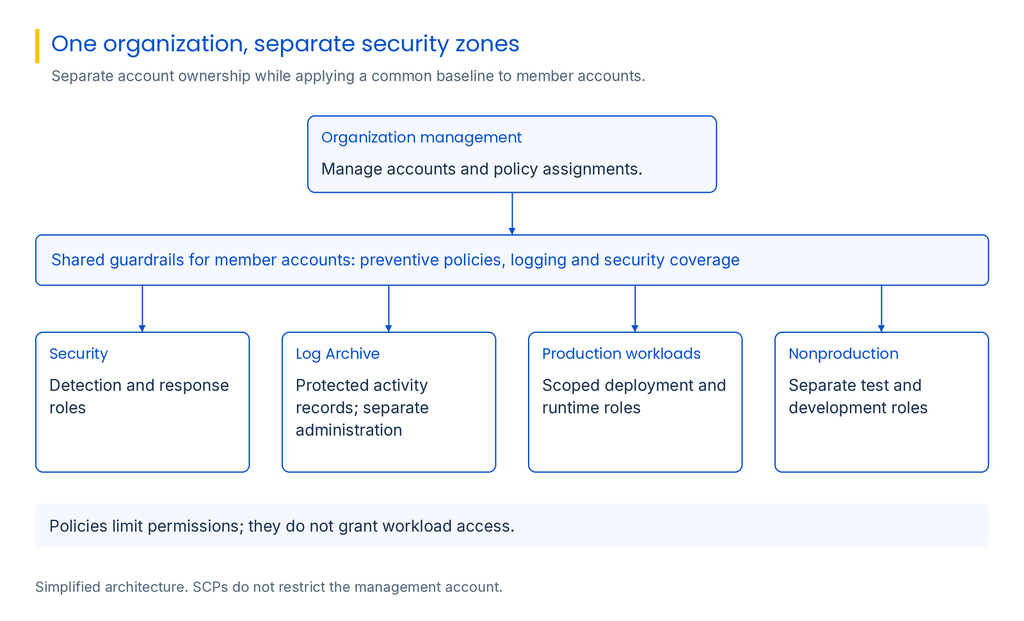
Start with the shape of the environment. AWS accounts are useful boundaries for workload ownership, environments, and separation of duties. An organization can group accounts by purpose and apply common guardrails while keeping application permissions and day-to-day changes with the workload team. AWS’s Security Reference Architecture and Well-Architected Security Pillar both describe account separation as a foundation for operating workloads securely.
The shared responsibility model depends on the AWS capability and workload. AWS secures the underlying infrastructure; customers remain accountable for identity, data, applications, and some operating-system tasks. Translate that division into named owners for configuration, monitoring, response, and evidence.
Design guardrails that set limits without owning every choice
Organization policies should define a few non-negotiable boundaries, not every application decision. They can prevent accounts from leaving the organization, restrict unapproved Regions, protect logging destinations, and limit actions that disable security coverage. Workload teams need room to design within those boundaries.
AWS Organizations provides different policy types for different jobs. A service control policy (SCP) sets the maximum permissions available to principals in member accounts; it does not grant those permissions. A resource control policy (RCP) sets limits on access to supported resources, including access by principals outside the organization. AWS updated its guidance on RCPs in September 2026 and describes them as broad guardrails for security invariants, not a replacement for fine-grained identity and resource policies.
Roll policies out as changes with failure modes. Test in a representative organizational unit, simulate policies, identify break-glass access, and monitor denials before enforcement. Document exceptions with an owner, rationale, scope, expiry, and compensating measure. A guardrail that blocks recovery can pressure teams to disable it broadly.
Make identity the control plane
Most important AWS decisions are made through identities: human administrators, workload roles, CI/CD pipelines, and external partners. Centralize workforce sign-in where practical and favor temporary role sessions over long-lived access keys. Require strong authentication for privileged access, protect root-user credentials, and establish a tested emergency-access path that is both usable during an outage and visible to responders.
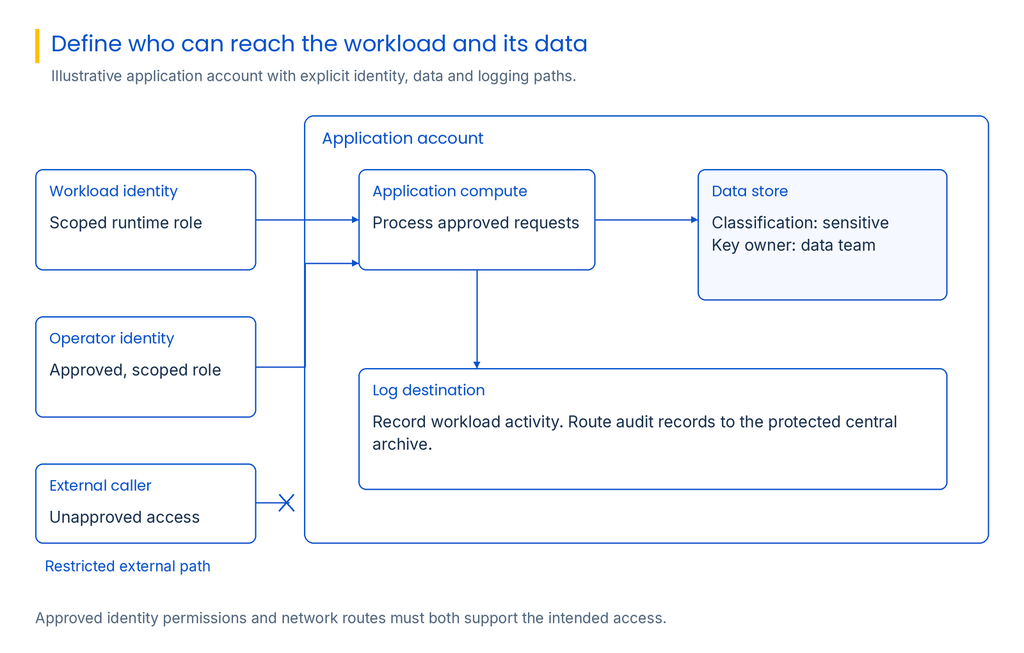
Give workload identities only the permissions needed by a specific application and environment. Separate deployment and runtime roles; avoid reusing broad roles across development and production. Review trust policies as carefully as permissions, keep credentials out of code and build logs, and revoke exposed credentials promptly.
Align identity boundaries with workload and data boundaries. Production roles should not inherit access from development accounts. Explicit trust relationships and scoped permissions make privilege understandable and constrain compromised credentials.
Protect data and network paths by workload
AWS security best practices for data begin with knowing what the workload stores and who should reach it. Classify sensitive data, identify the systems that process it, and define the identities and network paths required for each use. Encrypt data in transit and at rest using controls appropriate to the workload, with key ownership and recovery responsibilities clearly assigned. Encryption does not correct an overbroad access policy, so review who can read the data and who can change the key policy.
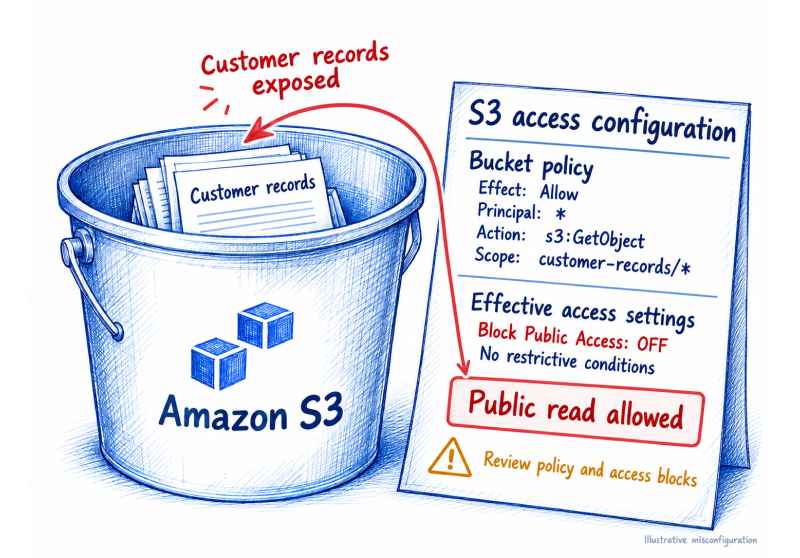
Block unintended public storage access, then review bucket policies, access points, and cross-account grants. Use security groups as workload-specific filters, remove obsolete ingress, and avoid public administrative access. Document the system owner and rationale for each necessary exception.
Design egress deliberately. Private connectivity, endpoint policies, DNS, and outbound filtering can reduce unnecessary paths but may affect updates or response. Record intended flows and test both application and operational routes for patching, backup, monitoring, and recovery.
Centralize visibility so accounts can be investigated together
A multi-account environment needs a reliable way to answer: what changed, which identity acted, what resource was affected, and what happened next? Configure organization-wide, multi-Region activity logging and send records to a protected log archive account with tightly limited write and delete access. Keep administrative access to that archive separate from the roles that deploy applications. Confirm that new accounts and enabled Regions join the logging design automatically.
Logs alone do not create incident readiness. Define who investigates, how responders access evidence and contain a workload, and how cross-account access is granted. Rehearse CloudTrail investigation across your own accounts, roles, and escalation paths.
Use native detection where it fits, but a central console does not prove complete coverage. Define which accounts and Regions are enrolled, who reviews alerts, and who responds. For AI workloads, AWS’s June 2026 AI Security Best Practices standard adds configuration checks for certain Bedrock, AgentCore, and SageMaker resources; it does not replace application threat modeling or data-use decisions.
Make secure defaults part of account creation
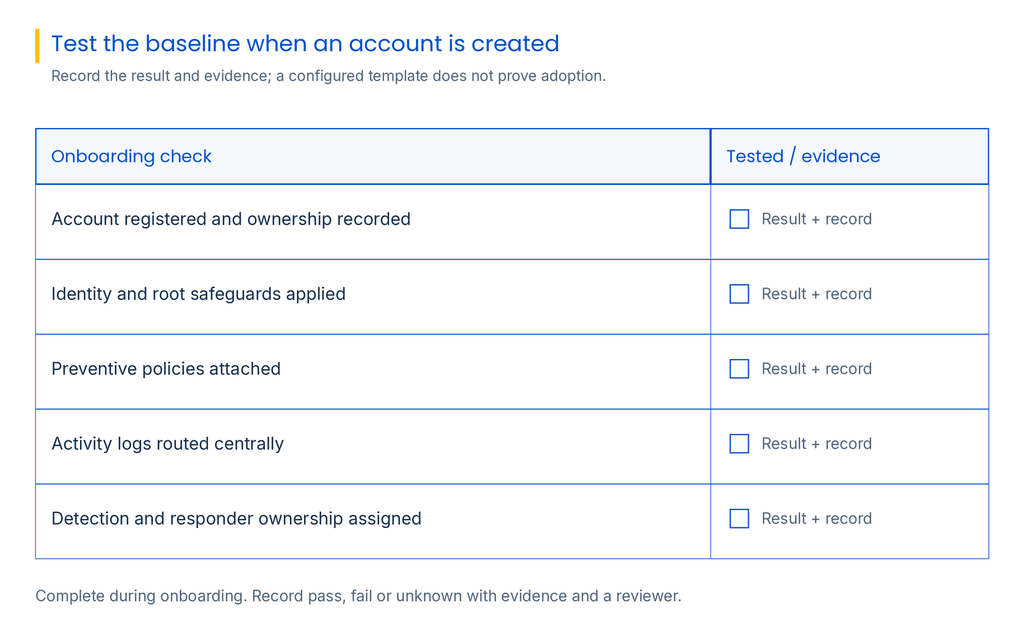
Checklists help reviewers, but they are weak controls for repeated account creation. Put identity federation, policies, logging, contacts, tags, network defaults, encryption expectations, and exception routing into the account vending path and infrastructure-as-code templates. Assign an owner to maintain them as needs change.
Test that new accounts receive the configuration and that workloads can still perform business and recovery tasks. This catches rules that pass a compliance check but block backups, deployment, or response. Record results; a template alone does not prove adoption.
Illustrative scenario: a new AI workload joins the estate
Consider a team building an internal document assistant that needs a model, a document store, and a few APIs. In an unstructured environment, it may launch in a shared account, reuse a broad deployment role, and rely on local logs. That makes credential containment and data-access investigation harder.
Instead, create a dedicated account from the baseline, separate deployment and runtime roles, and have the data owner approve access. Guardrails protect central logging and data boundaries. Route CloudTrail to the log archive, assign detection ownership, and test normal use, denied access, rollback, and containment before launch.
This scenario is illustrative, not a reported customer deployment. The architectural lesson is that security should arrive with the workload, not as a post-launch review. Account boundaries reduce the scope of a mistake; identity and data policies determine what that mistake can reach; centralized visibility helps responders understand what happened.
Connect technical guardrails to accountable oversight
AWS controls cross teams: architecture defines boundaries, cloud engineering encodes them, application owners operate workloads, and GRC checks evidence. Link each control objective to its in-scope account or workload, owner, evidence, and exception path. A green configuration result alone does not prove that every obligation is met.
SPOG’s Exposure Management solution describes connecting asset, threat, control, business, ownership, and workflow evidence to prioritize exposures. Its Continuous Control Monitoring solution describes connecting defined controls with operational evidence to assess coverage and effectiveness. These solutions may be relevant where teams need AWS signals to sit alongside broader governance and security evidence; organizations should confirm data coverage and integrations for their own environment.
Build a repeatable AWS security baseline
A secure AWS environment comes from account boundaries that match workload ownership, durable guardrails, narrow identity and data access, and organization-wide visibility. Teams also need clear owners, tested recovery paths, and an exception process that preserves the baseline.
Review the design when workload types, data classes, or access paths change. Test a newly provisioned account and rehearse a cross-account investigation. These checks show whether AWS security best practices work in operations, not just in policy.
Frequently asked questions
Protect identities, data, workloads, and configurations with account separation, least privilege, organization guardrails, protected logs, and tested response.
AWS protects underlying infrastructure; customers secure identities, data, applications, and configurations based on the capabilities they use.
They isolate workloads and ownership, enable central policies, and can limit the effect of errors or compromised credentials.
An SCP sets the maximum permissions available to principals in member accounts; it does not grant permissions. An RCP sets limits on access to supported resources, including access by principals outside the organization.
Use strong authentication, restrict root use to required tasks, monitor activity, and test documented emergency access.
Apply a common baseline, tailor policies to workload needs, and make exceptions approved and time-bound.
Enable organization-wide, multi-Region logging to a protected archive; restrict access and verify new-account enrollment.
No. Routing, endpoints, DNS, perimeter controls, application design, and identity permissions also shape network security.
Use baseline account, identity, data, network, logging, and response controls, then add AI threat modeling and data-use decisions.
Review on a regular cadence and when workloads, data, or access patterns change; test prevention and recovery.
With 8.5+ years in B2B SaaS, I’ve led demand generation and GTM initiatives across global markets (US, UK, Europe, Africa), helping companies move from fragmented marketing efforts to structured, revenue-focused growth engines.