Overview
SPOG.AI integrates with ARCON Privileged Access Management (PAM) to provide centralized visibility into privileged service inventory, metadata, dependency relationships, license utilization, and session monitoring coverage. The integration uses secure REST APIs exposed by ARCON PAM, enabling SPOG.AI to retrieve governance-relevant telemetry without interacting with live sessions or sensitive credentials. The collected data is normalized into the SPOG.AI asset model to evaluate governance posture across coverage, ownership, and risk. SPOG.AI operates strictly in read-only mode and does not initiate sessions, execute commands, or access credentials.
Key Features
| Capability | Description |
|---|---|
| Privileged Service Inventory | Builds a complete inventory of privileged services with their metadata. |
| Dependency Mapping | Identifies service interdependencies and credential dependency chains. |
| License & Capacity Tracking | Tracks allowed versus current users and services to detect overutilization. |
| Session Monitoring Coverage | Measures which privileged services are monitored and identifies coverage gaps. |
| Governance & Ownership Insights | Uses service metadata to identify ownership gaps and segment production from non-production environments. |
| Dependency Risk Analysis | Highlights critical dependency chains and high-risk services with cascading impact. |
| Compliance & Audit Support | Supports asset inventory validation, monitoring coverage verification, and license compliance tracking. |
| Read-Only, Low-Volume Collection | Collects only governance-relevant data and never initiates sessions or accesses credentials. |
How the Integration Works
SPOG.AI uses a secure, outbound, API-based pull architecture. It establishes an encrypted HTTPS connection to the ARCON PAM APIs and authenticates using a Bearer Token (/arconToken), which it obtains with the credentials of the ARCON API user created during configuration. SPOG.AI then periodically invokes the APIs to retrieve service inventory and metadata, dependency mappings, and license and capacity data. The data is normalized into the SPOG.AI asset model, where SPOG.AI evaluates governance posture, including coverage, ownership, and risk. SPOG.AI does not initiate sessions, execute commands, or access credentials, and operates strictly in read-only mode.
Data Collected
| Category | Data Collected | Description |
|---|---|---|
| Service Inventory & Metadata | Service ID; hostname / IP address; service account (username); domain and instance details; service type (RDP, SSH, DB, etc.); port and grouping (LOB / server group) | Establishes a complete inventory of privileged services and enables ownership, classification, and segmentation. Retrieved via /GetActiveServiceList. |
| Dependency Mapping | Parent-child service relationships; credential dependency chains | Identifies cascading risks and service interdependencies. Retrieved via /SetServicepwdDependancy and /GetDependantServiceList. Only data retrieval is performed; nothing is changed in ARCON PAM. |
| License & Capacity Data | Allowed vs current users; allowed vs current services; license utilization status | Supports capacity planning, license compliance, and detection of overutilization. Retrieved via /License/UserDetails and /License/ServiceDetails. |
| Session Monitoring Coverage | Service inventory validated against monitoring expectations; RTSM capability verified through lightweight API indicators; monitoring coverage across all services | Ensures all privileged services are monitored and identifies gaps in session monitoring coverage. |
Prerequisites
Before configuring the integration, ensure the following prerequisites are met:
- Organization or Tenant Admin authorization in SPOG.AI.
- ARCON PAM deployed and API-accessible, with the API module enabled (default with installation).
- Access to ARCON PAM with an account that has Administrative access.
- Outbound HTTPS connectivity from SPOG.AI to ARCON PAM on port 443 (or a custom API port), using TLS 1.2 or higher.
- Firewall or proxy rules that allow outbound access to the ARCON PAM API endpoint.
Configuration
1. Create an Integration Account in ARCON PAM
Create a dedicated API user that SPOG.AI will use to read data from ARCON PAM. Administrative access to ARCON PAM is required.
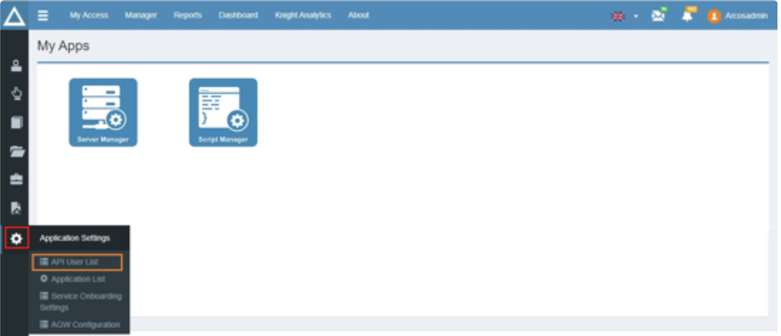
- Log in to ARCON PAM and navigate to Application Settings → API User List. The API Registered User List appears.
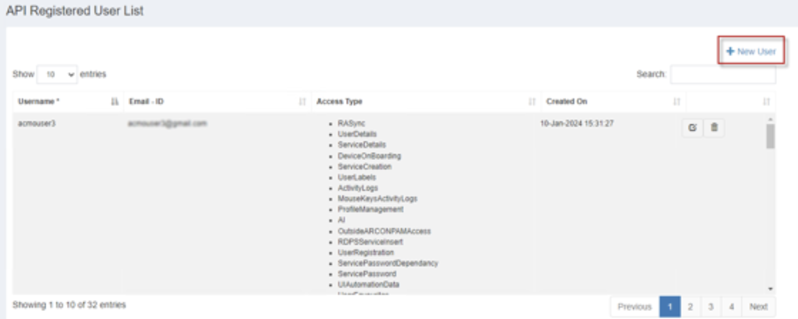
- Click + New User to create a new API user.
- Enter the new user details and click Register.
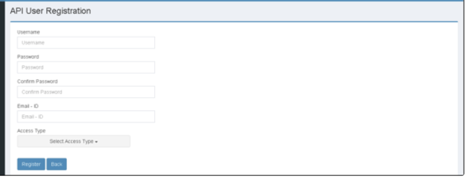
- Refer to the following table for the data to enter in each field:
| Field Name | Description |
|---|---|
| Username | The name of the API user. |
| Password | The password of the API user. |
| Confirm Password | Re-enter the password of the user. |
| Email ID | The email ID of the user. |
| Access Type | Select the type of access for the user. Select ARCON PAM Service Details and ARCON PAM User Details. Do not select ARCON Service Creation, because SPOG.AI does not create or modify services. |
2. Configure ARCON in SPOG.AI
- Log in to your SPOG.AI account.
- Navigate to Connected Hub → Add Integrations and select Arcon Integration.
- Enter the details collected in the earlier steps:
| Setting | Value |
|---|---|
| API URL | The ARCON API base URL, for example https://arcon.example.com/. |
| Username | The API user created in ARCON, with the required permissions. |
| Auth Method | Password. Enter the password of the API user. |
- Click Save to complete the integration setup.
3. Link the Integration with an Appliance
- Navigate to Administration → Appliance and select the appliance where the integration should be enabled.
- Open the Integrations tab, click Link, and choose the integration you created in the previous step.